Ubersuggest: Your Guide to Keyword Research Tools
Ubersuggest: Your Guide to Keyword Research Tools
What Ubersuggest Is and Who It's For
Overview
Ubersuggest is an SEO and keyword research tool built around one core promise: fast, accessible insights without a steep learning curve. Where some platforms bury useful data under layers of dashboards and jargon, Ubersuggest surfaces search volume, competition scores, and content ideas within seconds of entering a term. It sits comfortably within the broader keyword research tools landscape as a practical middle ground — sophisticated enough for experienced marketers, yet approachable enough for someone running their first blog.
The tool operates as a web app at ubersuggest.com and extends into the browser through a Chrome extension that overlays keyword metrics directly onto Google search results pages. Both free and paid tiers exist, so you can evaluate the platform before committing to a subscription.
Best Use Cases
Ubersuggest earns its place for bloggers validating content ideas, small businesses scoping local SEO opportunities, and digital marketers who need quick keyword confirmation rather than enterprise-grade analysis. If your workflow demands rapid ideation — finding 20 viable long-tail targets before a Monday meeting — Ubersuggest delivers that efficiently. Agencies managing lean budgets across multiple client verticals will also find value in its project tracking and site audit features, which consolidate several research steps into a single interface.
How to Access Ubersuggest Fast
Direct Navigation
Head straight to ubersuggest.com and, before running your first search, set your target country and language. This step matters more than most users realize — a search volume figure for "coffee shops" in the United States differs dramatically from the same query localized to the United Kingdom or Australia. Getting this configuration right upfront means every metric you pull is relevant to your actual market.
If you land on the platform through a search engine, typing something like "ubersuggest keyword" in Google will typically surface the keyword research module directly in the results, saving a few clicks on the navigation menu.
Account Setup
Creating a free account takes roughly 60 seconds via Google sign-in. The free tier imposes daily search limits, but it's sufficient for exploratory work and initial site audits. Paid plans unlock higher query limits, historical data, and expanded project tracking — more on that in the pricing section.
The Chrome extension is worth installing early. Once active, it automatically displays search volume, cost-per-click, and SEO difficulty scores alongside every query you run in Google. That passive data layer can shift how you evaluate research topics even when you're not actively inside the Ubersuggest dashboard.
Core Keyword Research Features
Keyword Overview
Enter any seed term into the Keyword Overview module and you'll immediately see monthly search volume, CPC, SEO difficulty scored from 0 to 100, and a 12-month trend chart. That trend line is particularly useful — it distinguishes evergreen topics from seasonal spikes and helps you prioritize accordingly. A term showing 8,000 monthly searches that trends flat is generally more bankable than one peaking in December and dropping to near-zero by February.
Keyword Ideas & Suggestions
The Keyword Ideas tab is where the ubersuggest keyword research workflow really opens up. From a single seed term, the platform generates related terms, long-tail variants, question-based queries, preposition phrases, and comparison keywords. Each variation carries its own volume and difficulty scores.
Filters are your best friend here. Set a maximum SEO difficulty of 35 to isolate lower-competition targets, apply a minimum volume threshold of 500 to avoid terms with negligible traffic potential, and use the include/exclude fields to strip out irrelevant modifiers. Within a few minutes, a broad topic becomes a curated shortlist of genuinely winnable keywords.
SERP & Difficulty Metrics
Ubersuggest pulls the actual search results for any keyword and displays domain authority scores, estimated monthly visits, and backlink counts for each ranking page. This context is critical. A keyword sitting at SEO difficulty 45 might still be approachable if the top-ranking pages have thin content and modest domain authority. Conversely, a difficulty score of 30 on a term dominated by high-authority news sites signals a tougher climb than the number suggests.
Content Ideas
The Content Ideas section surfaces the top-performing pages around a given topic, ranked by estimated traffic and social shares. Treat this as a competitive brief. Review which angles attract links, how long those pages run, and where their content falls short. Modeling your own piece against proven performers — rather than guessing — compresses the time between publishing and ranking.
Competitor and Site Analysis in Ubersuggest
Traffic Analyzer
Paste a competitor's domain into the Traffic Analyzer and Ubersuggest returns their top-ranking pages, estimated organic traffic, and the keywords driving that traffic. This is one of the most direct paths to identifying keyword gaps — terms your competitors rank for that your own site currently misses. Prioritize gaps where your domain has comparable authority and the keyword difficulty falls within a reasonable range.
Site Audit
The Site Audit module crawls your domain and produces a health score alongside a prioritized list of technical issues. Common findings include broken internal links, missing meta descriptions, slow page load times, and duplicate title tags. Each issue is categorized by severity, so you can address critical blockers before chasing marginal fixes. Running this audit monthly keeps technical debt from quietly compounding.
Backlink Insights
Ubersuggest's backlink reports show referring domains, anchor text distribution, and new versus lost links over time. For outreach campaigns, the data helps identify sites already linking to competitors but not to you — a standard link gap strategy made accessible without needing a separate backlink tool. Setting up project tracking lets you monitor these metrics over weeks rather than pulling manual snapshots.
Plans, Limits, and Pricing
Free vs. Paid
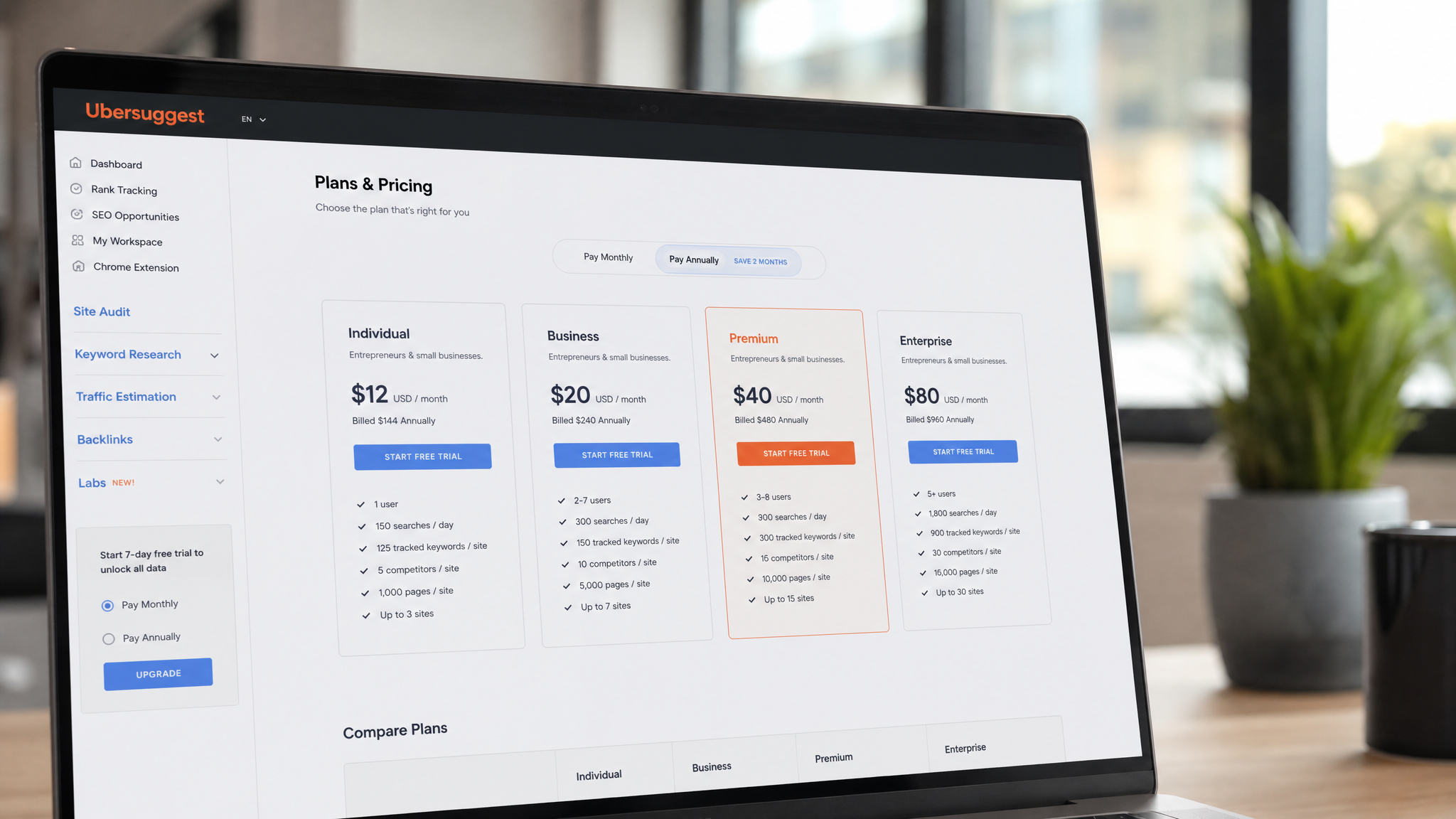
The free tier gives you a capped number of daily keyword searches and limits you to one or two projects. It's enough to test the platform and run occasional research, but sustained campaigns will hit those walls quickly. Paid plans expand daily queries, add historical keyword data, unlock more rank tracking projects, and provide access to broader regional databases — useful for international SEO work where you need localized volume figures across multiple markets.
Credits and Limits
Neil Patel's team periodically offers lifetime deal pricing alongside standard monthly and annual subscriptions. Worth checking the pricing page directly before committing, as promotions appear with some regularity. Inside your account dashboard, a usage summary shows remaining daily searches and project slots — reviewing this before a major research sprint helps you plan which queries to prioritize within your quota.
How Ubersuggest Compares to Other Keyword Research Tools
Strengths
Ubersuggest's biggest advantages are speed, simplicity, and cost. For teams that need keyword validation without a six-figure tool budget, it competes well. The interface makes it easy to move from seed term to keyword list to content brief in under 30 minutes — a workflow that would take longer in more complex suites simply due to navigation overhead.
Trade-offs
Ahrefs and Semrush carry larger link indexes and more frequently updated data, which matters for competitive niches where freshness directly affects analysis accuracy. Google Keyword Planner remains the gold standard for raw PPC volume ranges and pairs well with Ubersuggest for cross-referencing search demand before launching paid campaigns. For most content marketing and SMB SEO workflows, Ubersuggest handles the job capably. Reserve the enterprise tools for deep technical audits and high-stakes competitive research where index depth actually changes your decisions.
Quick Start Checklist for Ubersuggest
First 10 Minutes
Getting value from Ubersuggest quickly comes down to a focused sequence. Start by defining your seed term and running it through Keyword Overview to confirm there's meaningful search demand — no point optimizing for a term nobody searches. From there, open Keyword Ideas and capture 10 to 20 long-tail variants with SEO difficulty scores below 40 and monthly volume above 300. These targets form the foundation of a realistic content calendar.
Next, scan the SERP analysis for your top two or three targets to confirm the ranking pages are beatable given your current domain authority. Then run a Site Audit on your own domain — catching a critical technical issue early prevents that blocker from undermining whatever content you publish. Finally, save your keyword list inside Ubersuggest's project tools and activate rank tracking for your priority terms. That tracking data, reviewed weekly, tells you whether your efforts are moving the needle or whether your strategy needs adjusting.