Best AI Article Generator Tools for Blog Content in 2026

Content teams are under more pressure than ever. Publishing schedules have tightened, keyword targets have multiplied, and readers expect depth. An AI article generator doesn't replace a skilled writer — it removes the grunt work so writers can focus on what actually matters: insight, accuracy, and voice.
What Is an AI Article Generator and Why It Matters for Blogs
How It Works
At its core, an AI article generator takes a brief — keywords, target audience, desired length, maybe a rough outline — and produces a structured draft in seconds. Modern tools go well beyond simple text completion. They cluster related keywords automatically, suggest heading hierarchies, and can even propose internal linking opportunities based on your existing site architecture.
Feed a tool your primary keyword and a few supporting terms, and within minutes you get a working draft with SEO-optimized headings, a logical flow, and metadata suggestions. The better platforms let you control tone, reading level, and even reference specific style guides.
Benefits for Content Teams
Speed is the obvious win, but consistency is arguably more valuable. Multi-author blogs often drift in voice — one writer leans formal, another conversational, and the brand suffers. AI generators enforce style rules at scale, giving every draft a shared baseline before human editors touch it.
Time-to-publish drops significantly. Teams that once spent three days per post — research, outline, draft, edit, SEO check, publish — routinely cut that to under a day. The editorial team still reviews and refines, but they're starting from a 70% complete draft rather than a blank page.
Top AI Blog Content Tools Compared
Free AI Blog Content Generator Picks
Several solid free tiers exist if you're testing the waters. Writesonic, Copy.ai, and Rytr all offer free ai blog content generator plans with monthly word limits ranging from 2,000 to 10,000 words. They're genuinely useful for short-form posts and social content, though long-form articles typically hit a paywall fast.
The ai blog content generator free tier on most platforms restricts output to shorter pieces, limits template access, and removes team collaboration features. That's fine for a solo creator validating a workflow, but agencies will outgrow it within a week.
Paid All-in-One Platforms
Jasper, Surfer AI, and Frase sit at the premium end, and for good reason. Jasper integrates brand voice training directly into the generation pipeline — you upload past content, and the model learns your tone. Surfer AI combines content generation with real-time SERP analysis, scoring your draft against the top 10 results as you write. Frase leans heavily into the research phase, pulling live data from search results before a word gets generated.
Pricing across these platforms ranges from roughly $49 to $249 per month depending on word volume and seat count, with annual plans typically saving 20–30%.
Automated Blog Content Generator Features
The most powerful differentiator between platforms is workflow depth. An automated blog content generator that stops at "generate draft" is only half useful. Look for CMS sync (native WordPress plugin or API access for headless setups), scheduling capabilities, and multi-draft comparison so editors can pick the strongest angle before committing to a full edit. Some platforms now integrate directly with Notion, HubSpot, and Webflow — a genuine time-saver for teams already embedded in those ecosystems.
For teams managing multiple sites, an ai website content generator that handles both blog posts and landing pages from a single interface reduces tool sprawl considerably.
Key Features to Evaluate Before You Buy
SEO and Optimization
Any tool worth paying for should handle keyword clustering, on-page SEO scoring, and internal link suggestions natively. Standalone content and SEO tools rarely talk to each other cleanly — platforms that combine both save significant integration headaches. Check whether the tool scores against real SERP data or just internal benchmarks; the former is far more actionable.
Workflow and CMS Integrations
A brief builder and outline editor aren't luxuries — they're the foundation of a repeatable process. Multi-draft comparison lets editors A/B test angles before investing time in full refinement. Native WordPress plugins and headless CMS API support are non-negotiable for most teams. Export formats matter too: clean HTML export beats copying from a rich text editor every time.
Quality Controls and Brand Safety
Style guides and tone presets keep output consistent, but built-in fact-check aids and plagiarism detection add an essential safety layer. No AI tool is immune to hallucination — the models confidently generate statistics that don't exist. A platform that flags low-confidence claims or suggests source citations reduces editorial risk meaningfully.
Compliance and Data Governance
Enterprise teams need versioning, role-based permissions, and clear data handling policies. If client content is passing through a third-party AI model, you need to know whether that data is used for model training. Most reputable platforms offer data processing agreements and opt-out options — read the fine print before signing a contract.
Pricing and Plans Explained
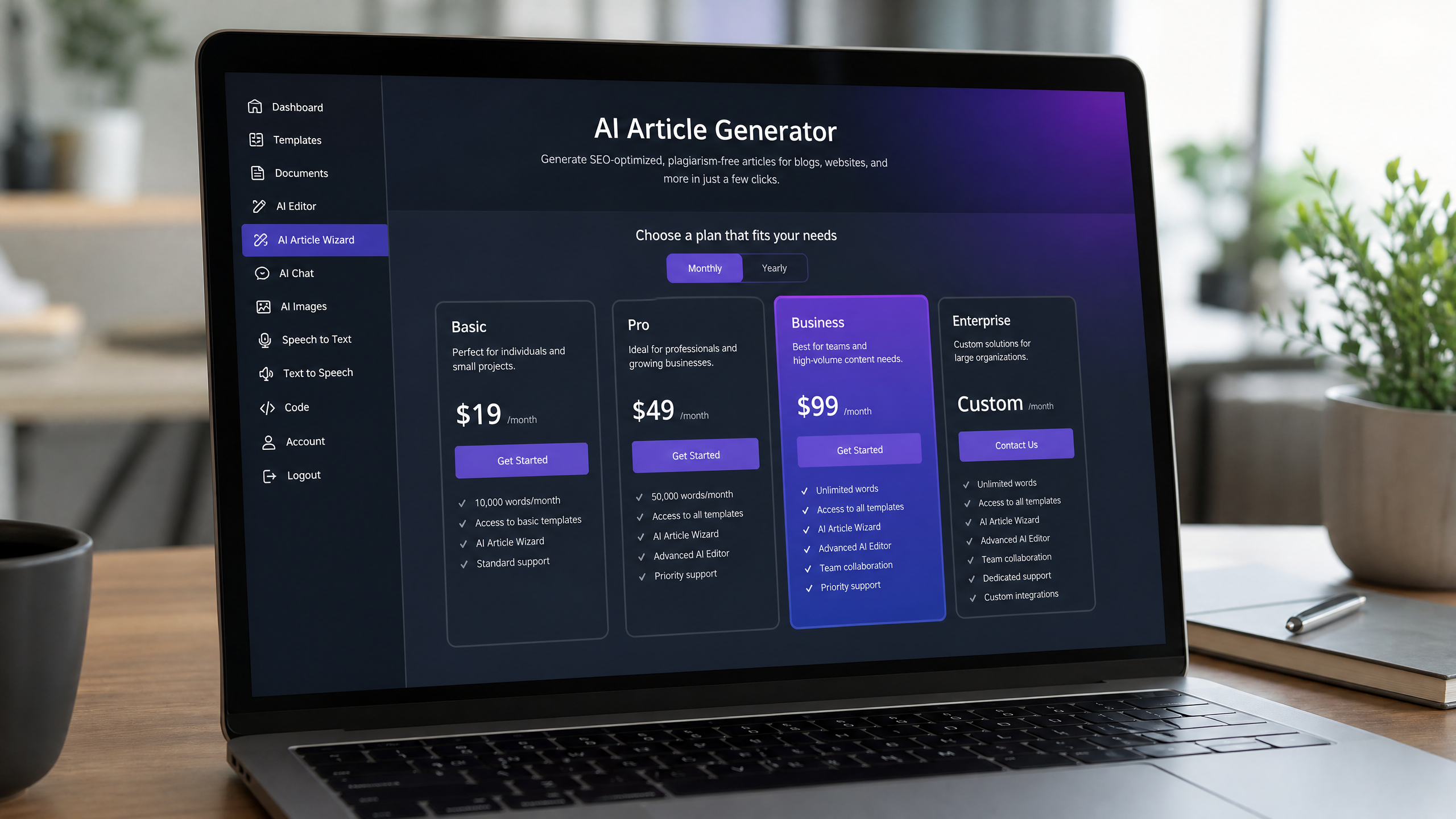
Free vs Paid Value
Free plans are starting points, not solutions. An ai blog article writer on a free tier typically caps output at 1,500–2,000 words per month — enough to test quality, not enough to run a blog. Paid plans for individual creators start around $20–$49 per month and unlock long-form generation, SEO integrations, and priority support.
Usage Limits and Tokens
Token-based pricing can catch teams off guard. Some platforms bill by word count, others by API tokens, and the math rarely lines up neatly with your actual publishing volume. Always calculate your real monthly word output — including drafts that don't make it to publish — before committing to a tier.
Team seats, SSO, and brand library access are often sold as add-ons rather than bundled into base plans. Factor those into total cost of ownership. Annual subscriptions typically discount 20–25%, and most platforms offer 7–14 day trials. Check the refund policy before paying annually upfront.
How to Use an AI Blog Article Writer Step-by-Step
Briefing and Prompts
Start with your primary keyword and build out a cluster of three to five related terms. Feed these into the brief alongside target audience, article length, and any competitor URLs you want to outperform. The quality of your prompt directly determines the quality of the output — vague briefs produce generic content.
Drafting and Refinement
Generate two or three outline variations and identify the strongest structural angle. Merge the best sections rather than accepting a single output wholesale. This hybrid approach consistently produces more original, higher-quality drafts than one-shot generation.
Optimization and Fact-Checking
Before the human edit, run the draft through the platform's SEO scoring tool. Add real sources, replace any AI-generated statistics with verified data, and adjust the tone to match your brand voice. Internal links should be added at this stage using the tool's suggestions as a starting point, not a final answer.
Publishing and Tracking
Push to your CMS via native integration where possible. After publishing, track rankings, organic CTR, and time-on-page over 60–90 days. Use that performance data to refine your prompts and briefs — the teams that iterate systematically see compounding improvements in AI output quality over time.
Buying Guide and Next Steps
Use Cases by Team Size
Solo creators should prioritize an ai website content generator that handles both blog posts and landing pages without requiring separate tools. Versatility matters more than depth when you're managing everything yourself. Agencies need bulk generation capabilities, client workspaces with permission controls, and white-label output options — features that typically live behind higher-tier plans.
Migration Checklist
Before switching platforms, confirm you can import existing briefs, templates, and style guides. Rebuilding a style guide from scratch in a new tool wastes weeks. Most platforms support CSV or JSON import for templates, but verify this before committing.
Try-Before-You-Buy Plan
Run a structured pilot: produce three to five real posts using the free trial, track how long the full workflow takes, and score the output against your current content quality baseline. Use workloads that mirror actual production — don't test with easy topics if your real content covers complex technical subjects. The ai blog content generator free trial period is your best intelligence-gathering window before any financial commitment.
Haze Tech Solutions helps businesses identify, implement, and optimize AI content workflows that deliver measurable SEO and efficiency gains. If you're ready to build a smarter content operation, the right tool is the one that fits your team's real process — not the one with the longest feature list.